Search this blog

Showing posts with label Tools. Show all posts

18 November, 2017

"Coder" color palettes for data visualization

Too often when programmers want to visualize data (which they should do often!), we simply resort to so called "coder-colors", encoding values directly into RGB channels (e.g. R = data1, G = data2 ...) without much consideration.

This is unfortunate, because it can both significatively distort the data, rendering it in a non perceptually linear fashion and biasing certain data columns to be more important than others (e.g. the blue channel is much less bright than the green one), and make the visualization less clear as we leverage only one color characteristic (brightness) to map the data.

The idea here is to build easy to use palette approximations for data visualization that can be coded as C/Java/Shader/etc... functions and replace "coder colors" with minimal effort.

Features we're looking for:

  • Perceptual linearity 
    • The palette steps should be equal in JND units
    • We could prove this by projecting the palette in color space made for appearance modeling (e.g. CIELAB) and looking at the gradient there. 
  • Good range 
    • We want to use not just brightness, but color variations as well.
    • We could even follow curved paths in a perceptually linear color space, we are not restricted to straight lines..
    • The objective is to be able to clearly distinguish >10 steps.
  • Intuitive for the task at hand, legible
    • E.g sequential data (0...1) versus diverging or categorical data (-1...1).
  • Colorblind aware
    • The encoding should primarily rely on brightness variation, color variation should be used only to try to increment the range/contrast and using colorblind safe colors.
Now, before I dump some code, I have to disclaim that albeit I tried to follow the principles listed above, I don't claim I am absolutely confident in the end results... Color appearance modelling is quite hard in practice, it depends on the viewing environment and the overall image being displayed, and there are many different color spaces that can be used.


The following palettes were done mostly by using CIELAB ramps and/or looking at well-known color combinations used in data visualization. 
The code below is GLSL, but I avoided on purpose to use GLSL vectors so it's trivial to copy and paste in C/Java/whatever else...

One-dimensional data.

vec3 ColorFn1D (float x)
{
x = clamp (x, 0.0, 1.0);
float r = -0.121 + 0.893 * x + 0.276 * sin (1.94 - 5.69 * x);
float g = 0.07 + 0.947 * x;
float b = 0.107 + (1.5 - 1.22 * x) * x;
return vec3 (r, g, b);
}

This palette is similar to R's "Viridis", even if it wasn't derived from the same data. You can notice the sine in one of the channels, it's not unusual for most of these palettes to be well approximated using sine waves because the most straightforward way to derive a brighness-hue-saturation perceptual color space is to use cylindrical transforms of color spaces that are rotated so one axis represents brightness, and the other two are color components (e.g. that's how CIELAB works with the related cylindrical transforms like CIELCH and HSLUV)

Palette, example use and sRGB plot

Note how the palette avoids stretching to pure black. This is wise both because the bottom range of sRGB is not great in terms of perceptual uniformity, and because lots of output devices won't do particularly great when dealing with blacks.

One-dimensional data, diverging.

vec3 ColorFn1Ddiv (float y)
{
y = clamp (y, -1.0, 1.0);
#if 0
float r = 0.569 + (0.396 + 0.834 * y) * sin (2.15 + 0.93 * y);
float g = 0.911 + (-0.06 - 0.863 * y) * sin (0.181 + 1.3 * y);
float b = 0.939 + (-0.309 - 0.705 * y) * sin (0.125 + 2.18 * y);
#else
float r = 0.484 + (0.432 - 0.104 * y) * sin(1.29 + 2.53*y);
float g = 0.334 + (0.585 + 0.00332 * y) * sin(1.82 + 1.95*y);
float b = 0.517 + (0.406 - 0.0348 * y) * sin(1.23 + 2.49*y);
#endif
return vec3 (r, g, b);
}

Palette, example use and sRGB plot

One-dimensional data, two categories.

Essentially, one dimensional data + a flag. It choses between two palettes that are designed to be similar in brightness but always quite easy to distinguish, at any brightness level.

vec3 ColorFn1DtwoC (float x, int c)
{
x = clamp (x, 0.0, 1.0);
float r, g, b;
if (c == 0)
{
r = max (0.0, -0.724 + (2.52 - 0.865*x)*x);
g = 0.315 + 0.589*x;
b = x > 0.464 ? (0.302*x + 0.641) : (1.27*x + 0.191);
}
else
{
r = 0.539 + (1.39 - 0.965 * x) * x;
g = max (0.0, -0.5 + (2.31 - 0.878*x)*x);
b = 0.142 + 0.539*x*x*x;
}
return vec3 (r, g, b);
}

Two examples, varying the category at different spatial frequencies
and the two palettes in isolation.

These palettes can't go too dark or too bright, because otherwise it won't be easy to distinguish colors anymore.
The following is a (very experimental) version which supports up to five different categories:

vec3 ColorFn1DfiveC (float x, int c)
{
x = clamp (x, 0.0, 1.0);
float r, g, b;
switch (c)
{
case 1 :
r = 0.22 + 0.71*x; g = 0.036 + 0.95*x; b = 0.5 + 0.49*x;
break;

case 2 :
g = 0.1 + 0.8*x;
r = 0.48 + x * (1.7 + (-1.8 + 0.56 * x) * x);
b = x * (-0.21 + x);
break;

case 3 :
g = 0.33 + 0.69*x; b = 0.059 + 0.78*x;
r = x * (-0.21 + (2.6 - 1.5 * x) * x);
break;

case 4 :
g = 0.22 + 0.75*x;
r = 0.033 + x * (-0.35 + (2.7 - 1.5 * x) * x);
b = 0.45 + (0.97 - 0.46 * x) * x;
break;

default :
r = g = b = 0.025 + 0.96*x;
}
return vec3 (r, g, b);
}

Two dimensions

Making a palette to map two dimensional data to color is not easy, really depends on what we're going to use it for. 

The following code implements a variant on the straightforward mapping of the two data channels to red and green, designed to be more perceptually linear.

vec3 ColorFn2D (float x, float y)
{
x = clamp (x, 0.0, 1.0);
y = clamp (y, 0.0, 1.0);

// Optional: gamma remapping step
x = x < 0.0433 ? 1.37 * x : x * (0.194 * x + 0.773) + 0.0254;
y = y < 0.0433 ? 1.37 * y : y * (0.194 * y + 0.773) + 0.0254;

float r = x;
float g = 0.6 * y;
float b = 0.0;

return vec3 (r, g, b);
}

Two-channel mapping and example use contrasted with naive
red-green direct mapping (rightmost image)

As an example of a similar palette designed with a different goal, the following was made to highlight areas where the two data sources intersect, by shifting towards white (with the mapping done via the red and blue channels, primarily, instead of red and green).
Beware of how this one is used, because it could be easily misinterpreted for a conventional red-blue channel mapping as we're so accustomed to these kinds of direct mappings.

vec3 ColorFn2D (float x, float y)
{
x = clamp (x, 0.0, 1.0);
y = clamp (y, 0.0, 1.0);

float r = x;
float g = 0.5*(x + 0.6)*y;
float b = y;

return vec3 (r, g, b);
}

Another two-channel mapping and example use contrasted 
with naive red-blue direct mapping (rightmost image)

Lastly, a (very experimental) code snippets for two-dimensional data where one dimension is divergent:


vec3 ColorFn2Ddiv (float x, float div)
{
x = clamp (x, 0.0, 1.0);
div = clamp (div, -1.0, 1.0);

#if 0
div = div * 0.5 + 0.5;
float r1 = (0.0812 + (0.479 + 0.267) * x) * div;
float g1 = (0.216 + 0.407 * x) * div;
float b1 = (0.323 + 0.679 * x) * div;

div = 1.0 - div;
float r2 = (0.0399 + (0.391 + 0.196) * x) * div;
float g2 = (0.232 + 0.422 * x) * div;
float b2 = (0.0910 + (0.137 - 0.213) * x) * div;
    
return vec3(r1, g1, b1) + vec3(r2, g2, b2);
#else
float r = 0.651 + (-0.427 - 0.138*div) * sin(0.689 + 1.95*div);
float g = 0.713 + 0.107*div - 0.0565*div*div;
float b = 0.849 - 0.13*div - 0.233*div*div;
    
return vec3 (r, g, b) * (x * 0.7 + 0.3);
#endif
}

DataLog & TableLog


What:
  • A simple system to serialize lists of numbers. 

Why: 

  • Programmers should use visualization as an everyday tool when developing algorithms. 
    • Most times if you just look at the final results via some aggregate statistics, for non trivial code, you end up missing important details that could lead to better solutions. 
    • Visualize often and early. Visualize the dynamic behaviour of your code!
  • What I used to do for the most part is to printf() from C code times values in a simple csv format, or directly as Mathematica arrays.
    • Mathematica is great for visualization and often with a one-liner expression I can process and display the data I emitted. Often I even copy the Mathematica code to do so as a comment in the C source.
    • Sometimes I peek directly in the process memory...
  • This hack’n’slash approach is fine, but it starts to be very inconvenient when you need to dump a lot of data and/or if the data is generated by multiple threads or in different stages in the program.
    • Importing the data can be very slow as well!
  • Thus, I finally decided I needed a better serialization code...

Features:

  • Schema-less. Serializes arrays of numbers. Supports nested arrays, no need to know the array dimensions up-front. Can represent any structure.
  • Compact. Stores numbers, internally, in the smallest type that can contain them (from 8-bit integers to double-precision floating point). Decodes always as double, transparently.
  • Sample import code for Processing.
  • Can also serialize to CSV, Mathematica arrays and UBJSON (which Mathematica 11.x can import directly)
  • Multi-thread safe.
    • Automatically sorts and optionally collates together data streams coming from different threads.
  • Not too slow. Usable. I would probably rewrite it from scratch now that I understand what I can do better - but the current implementation is good enough that I don't care, and the interface is ok.
  • Absolutely NOT meant to be used as a "real" serialization format, everything is meant to be easy to drop in an existing codebase, zero dependencies, and get some data out quickly, to then be removed...

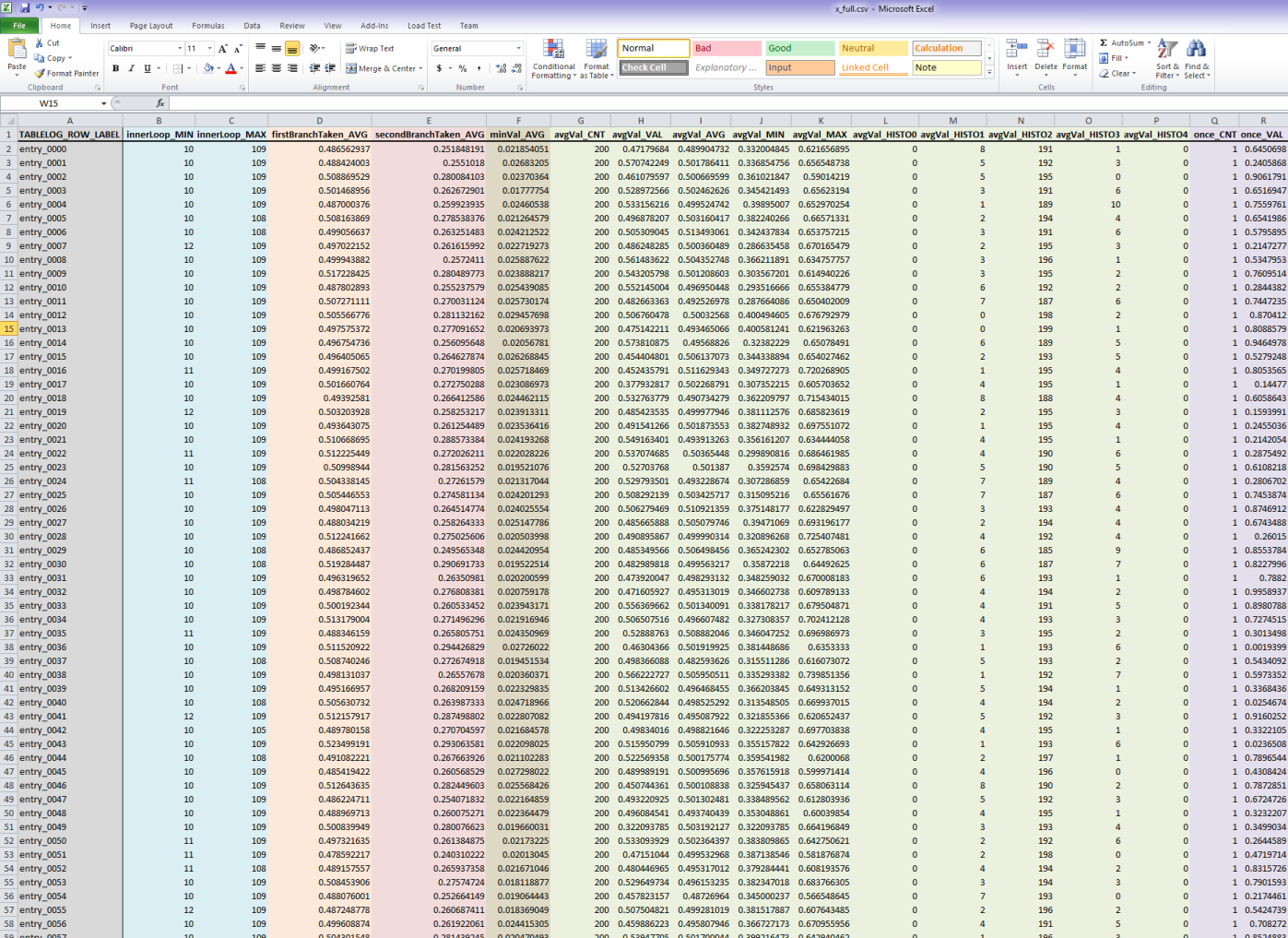
Bonus: "TableLog" (included in the same source)
  • A system for statistical aggregation, for when you really have lots of data...
  • ...or the problem is simple enough that you know what statistics to extract from the C code!
  • Represents a data table (rows, columns).
    • Each row should be an independent "item" or experiment.
    • Each column is a quantity to be measured of the given item.
    • Multiple samples (data values) can be "pushed" to given rows/columns.
    • Columns automatically compute statistics over samples.
    • Each column can aggregate a different number of samples.
    • Each column can be configured to compute different statistics: average, minimum, maximum, histograms of different sizes.
  • Multithread-safe.
    • Multiple threads can write to different rows...
    • ...or the same row can be "opened" globally across threads.
    • Columns can be added incrementally (but will appear in all rows).
--- Grab them here! ---

DataLog: C code - computing & exporting data


DataLog: Processing code - importing & visualizing data


TableLog: C code
TableLog: Data imported in Excel


More visualization examples...

22 August, 2012

Wanna play with OpenCL?

OpenCL Studio is a nice wrapper of OpenCL and Lua packed in a ad-hoc IDE. It’s a nice way to explore OpenCL and it has some video tutorials, but you might want to delve into it a bit faster than that.

Here’s a quick guide through its particles.3Dm example (OpenCLStudio 2.0). It won’t teach you anything of OpenCL, but it will guide you through a few things in OpenCLStudio and past that you should be at home if you know the basics of OpenGL and OpenCL (and Lua).

In fact (and that’s true for most my posts), I’m writing this as notes to self while I explore OpenCLStudio for the first time…

1) The Project tree and the main Scene window
Here you can create, view and edit (see the properties tab on the bottom of the application) all the main resources in the project (OpenGL, OpenCL and some OpenCLStudio specific things like its GUI and the Script Processor). Each resource is reflected and available to the scripting system (Lua).

Also notice on the top of the project tree two buttons, one to run the application, the other to reset it. The reset button executes all the non per frame scripts, so if you modify one of these you’ll need to reset to see the changes, all other scripts and shader code are automatically hotswapped after a successful compile.

Project tree elements can be added only if the project is in its reset state. In this state you get access also to some other edit abilities which don’t work after you run the application, for example if you create some OpenGL “geometry” it will be editable with manipulators in the scene, if the project is reset, but the manipulators won’t appear otherwise.

The scene window is pretty self explanatory, you can see here your 3d world (through the camera you have in the project tree) and all the GUI elements if you have them.

Notice that if you have the project running and you click on an OpenCL source in the tree (i.e. clParticles), in its properties you’ll get the timing of its various kernels. Nifty!

2) Script walkthrough

The tab named "script” shows the contents of one of the “script processors” (see again the project tree). The way this works is a bit unusual, the scripts are bound to objects in the scene tree (callbacks of said objects to be precise) and for some reason still unclear to me, each script processor can host only 32 objects and these are arranged in a 4x8 grid of slots in the processor.

You can create an arbitrary number of processors though and the position of a given object in a processor grid does not seem to mean anything, so in practice, if you want to script an object behavior, you just drag it into an empty slot of a processor and write some code for a given callback.

Most scripts associated with resources are to initialize them. Start looking at bfForce for example and its “OnDeposit” (creation) callback, and how it initializes its memory to zeroes. The “event” instance contains the information about the object whose callback is attached to, and its properties change depending on the object, you can read about them in help/inbuilt/classes.

Notice that all the windows with some code in them have a small red downward arrow button, that is the compile one. Kernels and shaders will be hotswapped after a compile, Lua scripts will be swapped as well but if they don’t execute every frame you won’t notice until you reset.

All the methods have a decent documentation that pops up automatically while autocompleting (or you can find it going in the Help tab, Inbuilt, and on the bottom selecting the Modules tab… OpenCLStudio seems to have some nice features but they are often slightly rough…).

Next, have a look at bfParams OnDeposit, which is a bit more complicated. Here it prepares this small param buffer and you can notice how the event is not read-only, in fact here it’s sizing the buffer based on struct.size(“System”) thus the size you declare in the object properties in the project tree won’t really matter (try to change it, reset the project, and see).

Ok, now it’s time to peek at the Global window in our Script tab… always visible this will get executed before everything else, and thus can declare some support structures for the entire script processor… Here you can see it creates the struct named “System” with some fields (struct is a way OpenCLStudio has to map raw data arrays to c-like structures) and then some global variables. Now it should be clear that bfParams OnDeposit takes the OpenCL buffer of the bfParams object, sizes it and then assigns to it an “intepretation” saying that it will correspond to the “System” structure which is used to pass to the OpenCL kernels the application parameters, then it maps it, telling that the buffer will be writable from the application (CPU).

You can peek around all the OnDeposit/OnRemove members, when you’re satisfied, go to the meat of the application, which is the per frame execution contained in OpenCL OnTime. This does everything, and really it’s in the OpenCL object but it doesn’t access the “event” so it could be everywhere in an OnTime, you can move it into the OpenGL object for example and you’ll notice it will still work.

This main application code is very straightforward and should not surprise you at all.

3) GPU Code and how the particle system works
The code tab is where the GPU code is. If you select and OpenCL module or an OpenGL shader in the project tree, the code tab will display its code.

So, how is this particles.3Dm example implemented? Well, looking around, starting from the OpenCL OnTime script, you’ll notice how things are arranged.

Particles are split into an OpenGL representation, made of three streams: Position, Color and Velocity. Position and Velocity are updated by OpenCL kernels (clEnqueueAcquireGLObjects…), Color is set via a Lua OnDeposit method and never changed. In this example the OpenGL shaders do not use the velocity stream, so it could have even not be declared as an OpenGL buffer.

The integration is done using a simpler Euler step (clIntegrate kernel followed by clClipBox), then particles get sorted via a spatial hash (clHash/radix sort/reorder kernels) into the bfSortedVel and Pos arrays.

Notice how the radix sort does not require all the clSetKernelArg calls and so on, it’s part of the libCl opensource library (by the same authors of OpenClStudio) and has been wrapped by in a way that takes care of all the binding outside Lua.

After sorting, particles are assigned to buckets, which are represented by a start and end index into the sorted particle array (bfCellStart and End). This is done via the clBounds kernel, which per each particle it compares its hash with the hash of the next particle (remember, they are sorted by now) and when a difference is found it knows a particle block ended and it writes cellEnd and cellStart. This kernel is interesting as it uses the thread local space to avoid fetching twice from global memory the hashes (which on a modern card is not actually faster, but still...). Notice how the local space is assigned in the Lua script, clSetKernelArg reserves space for one unsigned int per thread plus another global int (see how the work is grouped into 256 thread units in clEnqueueNDRangeKernel).

All this bucketing is done obviously to speed up particle/particle collisions, done via clCollideParticles is a pretty unsurprising way, notice how in the global Lua script the CELLSIZE is twice the particle size. After that, analytic collisions with the scene’s big unmovable spheres is done, this again is fairly trivial and will also take care of getting the data back into the unsorted rendering arrays.

As you can see this example, I think for sake of clarity, does many more passes (kernels) than it could have, particles2.3Dm is not better, it just adds more eye candy, so it’s a nice starting point for your own experiments. Have fun!

06 July, 2012

Exposure renderer

Sorry, not a "real" post yet... But I had to blog this, exposure renderer, an opensource cuda volumetric path tracer. It's soo fun, add light, change the transfer function... try it. Some images I've made with the default data sets:


17 March, 2012

Other tools that I use...

Most of the blog posts here are made for a selfish reason, to remind me of things I would quickly forget otherwise, it's really a personal diary more than anything else...

Over the years I've made a few posts which help me every time, like in the past month, I start a new job or have to setup a new computer, and I even silently update them time to time.

Certainly these fit in said category:
http://c0de517e.blogspot.ca/2011/04/2011-tools-that-i-use.html -- this is the only one I (try) to keep up to date!

Now I'd like, and probably it's going to be the last piece of this puzzle, to write down some of the remaining software stuff I found important to do my job.
This is mostly about the tools I use on my iPad, on my Samsung Galaxy (Android) and on the cloud...
  • Dropbox. Easy and really really important to me. I use it both for photography and coding, it's available on Mac, Pc, Android, iOS and Web, so it covers everything. I particularly love the Android integration which allows me to snap photos of notes and things I want to remember and then upload them directly into my dropbox account. Essential!
  • Wunderlist. Another cross-everything tool, it replaced the non-cloud tools I had on iOS
    • I prefer it to Remember The Milk because even if the latter is probably more powerful, it's free account it too restricted for me, and the paid one a bit too expensive.
    • Many people swear by Evernote. Maybe one day, I like a lot keeping most of my stuff on Dropbox today...
  • ...speaking of which PlainText on iOS is a neat text-editor that syncs into a folder in your dropbox account. There are a number of similar editors nowadays, even with Markdown functionalities, I don't end up using it very often anyways.
    • For handwriting Bamboo Paper. Best natural writing app I've found, I think it feels better than Penultimate which is very good too. Paper is nice to make diagrams and sketches look pretty easily.
    • One day I'll buy a Jot Touch, I like the Jot pens, but if you use an antiglare screen (as I used to, PowerSupport seems to be the best) then it might scratch it...
  • Reeder for iOS was my choice for google reader offline reading, but now google reader is dead and the iPad version of Reeder seems dead too. My solution: MrReader and Feedly
  • iAnnotate PDF. Best PDF reader for iOS that I've found
  • VLC (videolan) player for iOS. Has been pulled from the store over a petty argument about its licensing, but now it's back!
  • ReadItLater (now called Pocket), both the iOS client and I have bookmarklets on my various browsers. I use it also as an offline reading tool, especially when I travel I upload all the travel guides I want (i.e. wikitravel) and then cache them on the iOS client...
  • ZooTool for bookmarks (which for me is bookmark sharing, I don't really care about the bookmark library myself, I just figured that I do a lot of work to read feeds and other stuff on the web so I can create and share such a list for others to benefit...). I'm shying away from this as I use Twitter more and more
  • Just started trying Spreed, which is a cool web based speed reader with a nice bookmarklet.
  • iTunesU/Coursera/and similar
  • http://www.rainymood.com/ rarely, as I don't mind the noise and I often find background chatter to be quite nice, I listen to a lot of Italian news and politics at work :)
  • http://sleepyti.me/
Other stuff that I use that are not really work related:
  • iOS: Zinio (magazine newsstand), Fancy (cool stuff), SpyderGallery (as I have a Spyder color calibrator), Air Video (great to share videos from my iMac to the iPad), Photosmith (at a given point I wanted to write something exactly like that, to allow selection and rating which is a tedious process, of Lightroom photo collections), Daytum (personal logging)
  • Android: WhatsApp (messaging), Glympse (rarely used) and Poynt (rarely used...), HDR Camera (half-decent, the HDR merging is good but the alignment is really cheap and looses sharpness)
  • Cloud: Yelp, to decide where/what to eat, PreyProject.com to protect my macbook and my Android stuff, LogMeIn for remoting
  • Physical world: I write on paper. Yes, I've tried iPad and styluses and gloves and palm rejection and everything. It's terrible, and thinking otherwise is just a delusion caused by the fact we love our gadgets. It's many orders of magnitudes worse. And if you need a digital copy, just take a picture of the page with a cellphone. Now, that said, which pen and which paper, that's an interesting thing.
    • An A5-A6 spiral bound notebook. It's important to be spiral bound with an hardcover, if you're writing while commuting and so on you need a hard surface, the spiral bound books allow only the page you're writing on to be facing you and with the cover on the back they are the best in terms of stability. Field notes, Whitelines or the classic Rhodia.
    • Pencil, I use a KuruToga because it's cool with Uniball NanoDia leads (fairly soft).
    • Pens. Too many, I collect fountain ones and buy too many other writing instruments in general, from brush pens to very fine ballpoints to graphite and brushes... For an everyday fountain surely the best choice is a Lamy Safari. You want to couple it with a very smooth flowing ink like the Aurora black.
What iOS/Android/Cloud tools do you love? Suggestions?

18 January, 2012

Prototyping frameworks (rendering)

Every now and then, I look around for prototyping frameworks for my rendering work. I always end up with very little but maybe I'm too picky or too lazy. Here are some I've found:

Stuff I actually use:
  • FXComposer, both 2.5 and 1.8 (Nvidia does not host it anymore, so you have to google it) as they both crash/have problems in different ways. In particular, 2.5 seems to have problems clearing rendering targets (I use a pass with ztest always to clear), 1.8 crashes in some situations. 1.8 is also nicer for a programmer, but 2.5 is fairly usable. I use SAS and NVidia has some documentation (finally!) about it, to script render passes. In theory both also support proper scripting, but the documentation is thin. A few times when I wanted to look inside FXC 2.5 I used something like ILSpy or .net reflector to delve in the undocumented parts (that's to say, almost everything).
  • Wolfram's Mathematica. I wrote a couple of articles on this blog about it, it's great and I love it, I love the language, it's not what you would expect if you're a mathematician but for a programmer is pretty neat (well at least, if you like lisp-ish things, which you should, syntax apart)
  • Python/IPython (I like the Anaconda distribution) is a good alternative to Mathematica. I still use Mathematica most of the times and I'm not a Python expert, but I've done a few experiments with it.
  • SlimDX or SharpDX, to tell you the truth I mixed them up a few times, the names are similar. Bottom line, a DX wrapper for C#, I love C#. SharpDevelop if I don't have an updated visual studio which supports the last .net framework.
  • Processing. I wrote an article on the blog about using it with Eclipse for live-coding, it's neat, it's simple, it has a ton of libraries at this point, even to do 3d stuff and shaders but I use it mostly for 2d prototypes.
  • ShaderToy. There are a ton of offline programs that offer similar functionality, even on iPad, wherever, it's very popular. But. Having it online is nifty for some quick tests. Unfortunately crashes often on certain browsers/computers (the most common issue is for large shaders to take too long to compile, making WebGL think something's wrong). There are also lots of alternatives (kickJS editor, Shdr, GLSL playground and SelfShadow's playground), some more powerful (WebGl playground which also supports three.js), but ShaderToy is the most popular.
  • 3D Studio Max. It has an horrible support for shaders (at least it used to, and I suspect not much has changed since) and I never loved it (I love Maya even less though), but I used to know it (six years ago or so) and know maxscript, so I ended up prototyping in Max a few things. It can be handy because you can obviously manipulate meshes all the ways you want and define vertex streams and visually paint attributes on meshes. You can't really control the rendering passes though, so doing non-surface shaders or stuff other than the most basic post-effects is hard. Nowadays I don't use it much if at all.
  • Pettineo's framework. Comes with all his sample projects and it's a great, simple, well written C++/DX11 framework, very easy to toy with. I have my own fork with some improvements.
  • Jorge Jimenez demo framework - as Jorge is a coworker of mine, I have access to his latest version
Seem promising:
  • PhyreEngine, if you have access to the Sony stuff... Might be a bit overkill as it's a fully fledged engine, so the learning curve is not so steep per se but there are tons of examples.
  • Microsoft/DirectX MiniEngine. Quite nice! Also NVidia made Falcor, a "research" framework, but currently it's only OpenGL which is fairly sad (even if understandable as lots of HW extensions come out for OGL first...)
  • Bart Wronski's C# framework. A solid alternative to MJP's, with the added bonus of being C# code.
  • Karadzic's BGFX wraps Dx9, 11, 12, OpenGL, GL|ES and Vulkan! It's a bit higher-level than any of these APIs, providing a draw-centric model where draws are sorted on a per-draw key. Neat, even if I don't necessarily care much about being cross-platform while prototyping.
  • ReedBeta's DX11 framework.
  • Threejs.
Some other alternatives:
  • Erik-Faye Lund published the sources of his "very last engine ever" which is used in a bunch of great demos (as in demoscene) I didn't have the time to look into it much yet, but the name sounds great!
  • Hyeroglyph 3, it's the 3d engine that "ships" with the Practical Rendering and Computation with DirectX11 book (which is nice). It still has a bit more things that I'd like to (more of an engine than a framework) but it's nice. 
  • Matt Fisher BaseCode could be handy for some kind of experiments.
  • Cinder looks still a bit young, it has many nice things but it lacks some other which I would consider "basics". I feel the same about openFrameworks and to me Cinder looks nicer. Plus I don't love C++ that much, and Cinder depends on Boost which is a huge turn off :)
  • Humus Framework 3. This is great, it's simpler than a full fledged engine, it's easy to read and it has tons of examples and Humus is notorious for his graphic demos, which all come with sourcecode and were made with his framework!
  • Intel's Nulstein.
  • VVVV. It's a node-based graphic thingie. Which would seem like the least suitable thing for rendering prototypes, but it supports shaders, and it supports "code" nodes where you can write C#, so it might be worth a try...
  • OpenCL Studio, I used to use this for experimentation, but it seems abandoned, sadly.

14 July, 2011

Querying PDBs

We're in the final stages of our game and this means that almost everyone is chasing and fixing crashes, often debugging retail builds from core dumps, having to deal with nasty problems most times without much aid from the debugger.

Sometimes you're just looking at the memory, trying to identify structures: executable regions, virtual tables, floats and so on. From there you might hope to recover the type of the variable you're looking in memory and today we got an email from people trying to do exactly that, chasing a structure from some sparse hints.

So I thought, how cool would it be if we could execute queries on the debug symbols to find such things! 
Well it turns out it's really, really easy. One great tool that does something similar is SymbolSort, and it's written in C#, and it comes with sourcecode! Cool!

SymbolSort queries the PDB for global data symbols, here we are interested in global user defined types and their subtypes, it's a pretty similar thing. Also, Microsoft provides a Debugging Interface wrapped in a COM dll that does pretty much all you need, and it's trivial to call from C# or similar.

Of course debugging is only a small fraction of what you can do with PDBs, so this is really just an example to show how easy it is, from here you can do many nifty things like code-generating reflection, cross-referencing with profile captures to do coverage analysis or serialization modules and so on.


Disclaimer: I wrote this in half an hour. It's probably wrong and surely ugly. Play with it but don't trust it! It's just meant as an example of how easy it is to query PDBs via msdia.
In fact the test program I did is a bit more complex and complete than the one I posted here, that is a stripped down version that fits the blog better and IMHO is a better starting point. Also if you really plan to chase structures with this, keep in mind that this version does not recursively search into member structures and inherited stuff.


P.S. It turned out that this particular bug was caused by bad memory (the actual memory in the hardware - it happens quite often) so this exercise was ultimately useless :)

using System;
using System.Collections.Generic;
using Dia2Lib; // we need a reference to msdia90.dll in the project

namespace Test
{
    class Program
    {
        private static void GetSymbols(IDiaSymbol root, List< IDiaSymbol> symbols, SymTagEnum symTag)
        {
            {
                IDiaEnumSymbols enumSymbols;
                root.findChildren(symTag, null, 0, out enumSymbols);

                uint numSymbols = (uint)enumSymbols.count;

                for (;;)
                {
                    uint numFetched = 1;
                    IDiaSymbol diaSymbol;
                    enumSymbols.Next(numFetched, out diaSymbol, out numFetched);
                    if (diaSymbol == null || numFetched <  1)
                        break;

                    symbols.Add(diaSymbol);
                }
            }
        }

        private static bool IsMemberPointer(IDiaSymbol s) // Quick'n'dirty based on observation of 1 (one) pointer, I'm sure there are better ways
        {
            return ((s.type != null) &&
                    (s.type.name == null) &&
                    (s.type.type != null) &&
                    (s.type.type.name != null)
                );
        }

        private static bool IsMemberPrimitive(IDiaSymbol s, ulong length) // I'm not entirely sure about this one too :)
        {
            return ((s.type == null) && s.length == length);
        }

        private static bool SymbolPredicate(IDiaSymbol s)
        {   // see the IDiaSymbol documentation here: http://msdn.microsoft.com/en-us/library/w0edf0x4.aspx

            // It's around this size...
            if (!((s.length > 62) && (s.length <  67)))
                return false;

            List< IDiaSymbol> childSymbols = new List< IDiaSymbol>(); // Note: from what I've seen the symbols are arranges in the order they appear in the class/structure
            GetSymbols(s, childSymbols, Dia2Lib.SymTagEnum.SymTagData); // TagData will get us all the member variables, TagNull will get us everything

            // It has to have sub-symbols (fields)
            if (childSymbols.Count == 0)
                return false;

            // One has to be a matrix
            bool hasMatrix = false;
            foreach (IDiaSymbol subS in childSymbols)
                if ((subS.offset <  8) && // It should be one of the first members in memory
                    (subS.type != null) && // It's not a primitive type, so its type has to be a symbol
                    (subS.type.name != null) && 
                    (subS.type.name.ToLower().Contains("matrix4"))                    
                )
                    hasMatrix = true;
            if (!hasMatrix) return false;

            // Another one is a pointer to a matrix...
            bool hasPointer = false;
            for (Int32 i = 0; i <  childSymbols.Count; i++)
            {
                IDiaSymbol subS = childSymbols[i];
                if (IsMemberPointer(subS)
                    && (subS.type.type.name.ToLower().Contains("matrix4"))
                )
                {   //...followed by a 4 bytes integer
                    if (i <  childSymbols.Count - 2)
                        if (IsMemberPrimitive(childSymbols[i + 1], 4))
                            hasPointer = true;
                }
            }
            if (!hasPointer) return false;

            return true;
        }

        static void Main(string[] args)
        {
            DiaSourceClass diaSource = new DiaSourceClass();

            diaSource.loadDataFromPdb("game360_release.pdb");
            //diaSource.loadDataForExe(filename, searchPath, null);

            IDiaSession diaSession;
            diaSource.openSession(out diaSession);

            IDiaSymbol globalScope = diaSession.globalScope;

            List< IDiaSymbol> globalSymbols = new List< IDiaSymbol>();
            GetSymbols(globalScope, globalSymbols, Dia2Lib.SymTagEnum.SymTagUDT /* user defined type! */);

            List< IDiaSymbol> matchingSymbols = globalSymbols.FindAll(SymbolPredicate);

            foreach (IDiaSymbol s in matchingSymbols)
            {
                if(s.name!=null)
                    System.Console.WriteLine(s.name);
            }
        }
    }
}