Search this blog

18 August, 2012

Service Update: Cached Shadowmaps

This is probably not news, and I don't often post links or summaries of conferences, as there are many people that do a better job than I would at that, but since I posted a bad sketch of an half-tested idea a while ago about caching cascaded shadowmaps I got some inquiries about it. So why didn't I wrote something decent? Let me digress :)

At that time our team at work was trying to optimize a game's GPU performance, and among the various things, shadows were a problem. We were already experimenting with some forms of caching of static objects, we had this idea (inspired by looking at Crysis 2 in action... if you look closely you can see this) of rendering our far cascaded every other frame (five in total, in a frame we would 
update the first one and two of the remaining four).

This worked only so-so due to dynamic casters being able to walk "into" their own shadows, so we tried to cache the static objects and render only the dynamic objects every frame (for the two cached cascades). This turned out not to be a win with the size of our shadowmaps, we were basically using half of the shadow generation time in bandwidth/resolve, so the caching didn't really bring anything.
This consideration, killed for us the incentive to go further implementing other caching schemes, and left me wondering if on this generation of consoles this scheme could really turn out to be faster.

Well, wonder no more! Luckily, decent ideas tend to eventually be discovered many times and recently Mike Day published an excellent work (presented by Mike Acton) on something that he implemented which is closely related to the bad idea sketch I posted on the blog. His work is very detailed and provides all the information on how to implement the technique, so go and read this paper if you haven't already.

He does the caching by reprojecting the old information both in UV and in depth before splatting in the dynamic occluders, as at the time I was already concerned about the bandwidth, I was speculating of using the stencil to tag the z-near and z-far used to render a given region (that though would have worked only on 360 and ps3 where with some trickery you can access the stencil information while sampling the depth shadowmap, not on dx9) and using other hacks which are probably not worth their complexity as they would still result in the same worst-case scenario.

P.S. You might have noticed the little "posted with Blogsy" logo at the bottom of this article, this is the first time I use my iPad for the blog and I have to say, I'm pleased. This little app lets you write the post with all the formatting features (which I don't use) and integrates a browser and image functionalities so you don't have to fight with the broken (absent) multitasking of iOS.
And here, let me go full hipster with a photo taken with HDR Camera on Android, then abused on Instagram and uploaded to the blog via its Picasa account... It will burn your eyes :)


19 July, 2012

Job free(ish)

http://www.gamasutra.com/view/news/174374/Dead_Rising_2_developer_suffers_layoffs.php
I won't comment much on this, Capcom Vancouver is expanding and its ways of dealing with projects and technology are peculiar, some people found themselves to be not ideal fits. I did my best to honestly guide my area, as usual, in a way that I believe was for the best. It has been a very intense, stressful experience and that is why the blog also did't see many updates.
I doubt that I will be able to stay in Vancouver, considering the way the game industry is going here (I'm guessing this city became too expensive for what it offers to big game studios).
I will probably have some more time to update this blog. Stay tuned.

Update - I'll join a team until December for a project I'm really excited about, focusing on topics that are very dear to me. Then, I don't know yet... Thanks to everybody for the support and opportunities offered.

06 July, 2012

Exposure renderer

Sorry, not a "real" post yet... But I had to blog this, exposure renderer, an opensource cuda volumetric path tracer. It's soo fun, add light, change the transfer function... try it. Some images I've made with the default data sets:


17 March, 2012

Other tools that I use...

Most of the blog posts here are made for a selfish reason, to remind me of things I would quickly forget otherwise, it's really a personal diary more than anything else...

Over the years I've made a few posts which help me every time, like in the past month, I start a new job or have to setup a new computer, and I even silently update them time to time.

Certainly these fit in said category:
http://c0de517e.blogspot.ca/2011/04/2011-tools-that-i-use.html -- this is the only one I (try) to keep up to date!

Now I'd like, and probably it's going to be the last piece of this puzzle, to write down some of the remaining software stuff I found important to do my job.
This is mostly about the tools I use on my iPad, on my Samsung Galaxy (Android) and on the cloud...
  • Dropbox. Easy and really really important to me. I use it both for photography and coding, it's available on Mac, Pc, Android, iOS and Web, so it covers everything. I particularly love the Android integration which allows me to snap photos of notes and things I want to remember and then upload them directly into my dropbox account. Essential!
  • Wunderlist. Another cross-everything tool, it replaced the non-cloud tools I had on iOS
    • I prefer it to Remember The Milk because even if the latter is probably more powerful, it's free account it too restricted for me, and the paid one a bit too expensive.
    • Many people swear by Evernote. Maybe one day, I like a lot keeping most of my stuff on Dropbox today...
  • ...speaking of which PlainText on iOS is a neat text-editor that syncs into a folder in your dropbox account. There are a number of similar editors nowadays, even with Markdown functionalities, I don't end up using it very often anyways.
    • For handwriting Bamboo Paper. Best natural writing app I've found, I think it feels better than Penultimate which is very good too. Paper is nice to make diagrams and sketches look pretty easily.
    • One day I'll buy a Jot Touch, I like the Jot pens, but if you use an antiglare screen (as I used to, PowerSupport seems to be the best) then it might scratch it...
  • Reeder for iOS was my choice for google reader offline reading, but now google reader is dead and the iPad version of Reeder seems dead too. My solution: MrReader and Feedly
  • iAnnotate PDF. Best PDF reader for iOS that I've found
  • VLC (videolan) player for iOS. Has been pulled from the store over a petty argument about its licensing, but now it's back!
  • ReadItLater (now called Pocket), both the iOS client and I have bookmarklets on my various browsers. I use it also as an offline reading tool, especially when I travel I upload all the travel guides I want (i.e. wikitravel) and then cache them on the iOS client...
  • ZooTool for bookmarks (which for me is bookmark sharing, I don't really care about the bookmark library myself, I just figured that I do a lot of work to read feeds and other stuff on the web so I can create and share such a list for others to benefit...). I'm shying away from this as I use Twitter more and more
  • Just started trying Spreed, which is a cool web based speed reader with a nice bookmarklet.
  • iTunesU/Coursera/and similar
  • http://www.rainymood.com/ rarely, as I don't mind the noise and I often find background chatter to be quite nice, I listen to a lot of Italian news and politics at work :)
  • http://sleepyti.me/
Other stuff that I use that are not really work related:
  • iOS: Zinio (magazine newsstand), Fancy (cool stuff), SpyderGallery (as I have a Spyder color calibrator), Air Video (great to share videos from my iMac to the iPad), Photosmith (at a given point I wanted to write something exactly like that, to allow selection and rating which is a tedious process, of Lightroom photo collections), Daytum (personal logging)
  • Android: WhatsApp (messaging), Glympse (rarely used) and Poynt (rarely used...), HDR Camera (half-decent, the HDR merging is good but the alignment is really cheap and looses sharpness)
  • Cloud: Yelp, to decide where/what to eat, PreyProject.com to protect my macbook and my Android stuff, LogMeIn for remoting
  • Physical world: I write on paper. Yes, I've tried iPad and styluses and gloves and palm rejection and everything. It's terrible, and thinking otherwise is just a delusion caused by the fact we love our gadgets. It's many orders of magnitudes worse. And if you need a digital copy, just take a picture of the page with a cellphone. Now, that said, which pen and which paper, that's an interesting thing.
    • An A5-A6 spiral bound notebook. It's important to be spiral bound with an hardcover, if you're writing while commuting and so on you need a hard surface, the spiral bound books allow only the page you're writing on to be facing you and with the cover on the back they are the best in terms of stability. Field notes, Whitelines or the classic Rhodia.
    • Pencil, I use a KuruToga because it's cool with Uniball NanoDia leads (fairly soft).
    • Pens. Too many, I collect fountain ones and buy too many other writing instruments in general, from brush pens to very fine ballpoints to graphite and brushes... For an everyday fountain surely the best choice is a Lamy Safari. You want to couple it with a very smooth flowing ink like the Aurora black.
What iOS/Android/Cloud tools do you love? Suggestions?

DirectX9 vs depth resolve

GDC 2012 is over and I bet there are a lot of interesting new techniques to discuss and analyze. I didn't start this work yet (actually I still have to catch up with a few other conferences first, from Siggraph Asia to Eurographics I've not been doing my homework much lately) but what I love when I read papers is not really the application of a given concept (which in scientific papers is often presented in such a biased way that is hard even for experts to really understand the merits of a given implementation), but to find new ideas that can spark new applications.

One such paper was for sure the Variance Shadow Map paper by Donnelly and Lauritzen, which thought statistically illiterate people like me (I know probability, but I'm really a novice when it comes to statistics) a couple of things about means, averages and how these can be used in computer graphics.

After reading that paper a few notions should stick in your mind. The average over a comparison versus comparison over average is one, which applies directly to occlusion, but more in general, that you can summarize a population of samples in a few statistics, which are nicely additive.

If that is the case, then you can apply what you learned in other contexts, with varying degrees of success. And this brings us to the lame technique of the month... As you might know, DirectX 9 is a bitch when it comes to depth buffer resolves. Never-mind reading MSAA depth samples, even accessing depth information is pretty much hopeless unless you want to do hardware PCF shadows. So you end up writing to a colour R32F target your depth, and as you don't have MSAA sample access even in that case, if you want to do some depth-aware effects like SSAO or soft-particles, you're in a lot of pain.

Assuming you don't want to pay the ridiculous price of having to do a depth-prepass, with an extra R32F rendertarget, to then throw it away and not be able to use it as a early-depth priming for your next MSAA passes, your depth samples will be summed and averaged, while what you really would like is to compute a min-max buffer or something like that.

Something like that... We have average... We want to know something about these averaged samples... Mhm... Variance to the rescue? Let's try... This is a small test I did in a few hours, so it's not going to be cool. The whole point of this post is not to show a cool implementation but to stress that you should learn meta-techniques, not stress on implementations...

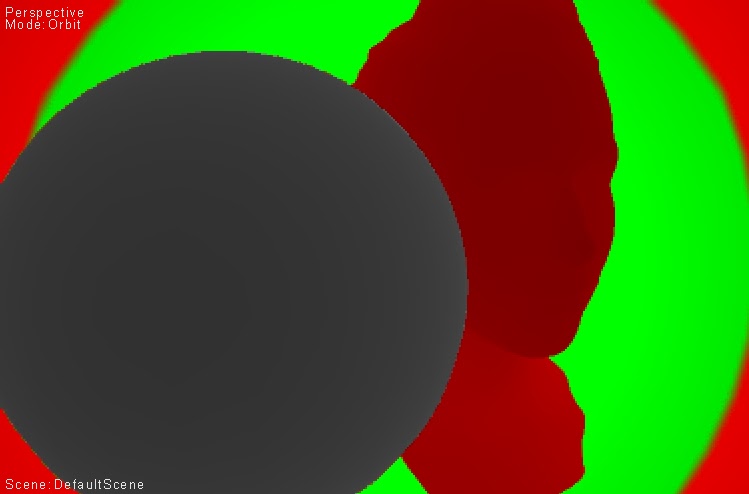
So here it is. I had a grayscale scene (shading = depth because I'm lazy) and on top of it I laid down two "depth fog" passes with a very very sharp falloff (the green and red thingies). That's because a sharp function applied to the depth is what you want to stress the worst case of fetching the average depth at object boundaries instead of the correct one.

This is what it looks accessing the MSAA R32F depth, averaged:

Notice the horrible edges...

This is how it looks by computing mean and variance in a 16bit ARGB buffer, and then offsetting the depth used in the fog computation by some function of the variance. This is to "emulate" a min-max buffer, where we choose only one of the two endpoints, which works for many effects (i.e. preferring the foreground).
Better, even in the jpeg compressed image... Even better, if we compute out of the variance two depths, then compute the fog with both endpoints, and average, as it would be more correct even having a full min-max buffer...
Detail... Good enough :)