Search this blog

12 February, 2013

HDR Workflows

Presentation time! This one started during my last stay at EA, I never completed it before now, so I couldn't present it live. As always, it has loads of notes and references, and in the current state is meant more as notes than a proper presentation.

Hopefully, the slide deck does some good explaining why, really, we need tonemapping (-when- we need it),  reminds everybody to help artists validate their work from proper references, and shows a (common) way to split brightness from color, an implementation of what Photoshop calls "vibrance" and some other little tricks.

As far as tonemapping operators, it derives a few curves, one of which is fairly similar (but worse) to Mike Day's recent work. Use his instead :)

10 February, 2013

Color blindness and videogames

After PC Gamers published this article on color blindness and games, I was curious to see what could be done and how, to target better the 5% (8% among males) of gamers affected with this deficiency. The original article didn't link any research or implementation hint but came with a note saying that it should be trivial to do... As most games nowadays do some form of color correction, often via volume color textures, you would think it's not hard to bake a global color transform that maps better the RGB space into what can be seen by colorblind persons.

Well, indeed, it is. Most papers seem to reference as a starting point a project report by Fidaner, Lin and Ozguven, "Analysis of Color Blindness" which derives a simple linear transform by going from RGB to LMS color space, simulating color blindness by losing one of the receptors in the LMS space, computing the difference between the two images and feeding back this difference by adding colors that can be perceived instead.
The algorithm is so simple it's easier to read the paper than my summary of it. Past this simple mapping, all the research I've found improve on the mapping by adjusting for the characteristic of the image you need to convey, which is not only more expensive but also could be not ideal in our case, as the image contents are changing frame to frame. I wonder if a nonlinear transform could improve the situation, but I haven't found much about static, global color transforms other than the aforementioned work.

Further notes:
  1. The website daltonize.org has implementations of the linear transform in many languages.
  2. Some papers seem to do the RGB->LMS (and viceversa) conversion in gamma space (including the Analysis of Color Blindness one), while some other don't. The confusion I guess comes from the fact that there are many RGB spaces, and not only sRGB with its gamma 2.2ish transfer function. From what Wikipedia says, CIEXYZ to LMS is a linear transform, and keeping in mind that sRGB to CIEXYZ is not, we have to gamma/degamma. I've also found this paper (comes with sourcecode) which makes conversion between sRGB to LMS an even less trivial matter.
  3. There are some variants of the original daltonization algorithm. In particular, this paper, proposes (among other things which are less relevant) the use of a modified error matrix (formula n.5).
  4. If you wanted to spare some GPU cycles, it's possible to feedback the error term computed by the daltonization in other post-effects, to locally enhance contrast of areas between two similar colors.
    1. This paper illustrates the concept.
    2. You could feedback into an existing, suitable effect (i.e. bloom)
    3. You could trade off a post/processing step for this, for example, remove DOF or motion blur and add an "unsharp mask" filter guided by the error. A way of doing this is to compute an unsharp mask, in a single pass, for both the regular and color-blind simulated colors, and then feedback the error (contrast loss) in the image.
  5. A color-blind simulation mode could at the very least, help UI designers with their job.

09 February, 2013

Tuning: Two-axis controllers, OSC and multitouch.

So far, and even in the near future I'd say, game visuals, even with physically-based (or inspired... or "reasonable") shading, have been a matter of tweaking and tuning, both by the artists and by the programmers, functions and parameters. Thus, the speed and intuitiveness at which this tuning, iteration happens, has a crucial, direct impact on the end results.

Now, if you've been following this blog for a bit, you might have noticed that I'm a strong proponent of live-coding, hot-swapping and all manners of ways to transform our art into a direct feedback mode of manipulation.
So I was very curious when I had, two weeks ago, the chance to attend talks by two of the forefront proponents and innovators in this field, the designer-coder-instructor-inventor Bret Victor and Pixar's and demoscene's manipulator of functions extraordinaire, Inigo Quilez.

I won't go into the details of these, but one thing struck me that I thought was worth further research and sharing: IQ's use of OSC to connect hardware midi (well, OSC) controllers to shader parameters in his demo/livecoding/vj system. Of course, such things make perfect sense when you're VJing in a club, and I've seen even in our industry some experiments with midi devices to control a variety of things in a game, honestly my experience relegated them as being most often nothing but a gimmick. Inigo, begin the smart guy he is, also came to a similar conclusion, with an exception though, when it comes to tune two or more correlated parameters, they have their space.

Of course! All of a sudden I feel so stupid having had to explain so many times all kind of multiply/add controls to artists! MADD is the shader coder best friend, it's cheap, it's powerful, it ends up everywhere. But for the artist, even when you "convert" it into the often more friendly add-multiply (just postprocess the data out of the tuning tool), and using the right bounds, constraints and so on, it often comes to be a pain to manage. I've always had these controls bound to two separate sliders, which is a really stupid idea, on a non-multitouch device (or without physical independent sliders).
Of course, you could just use a two-axis pad and control it with the mouse, the solution is quite obvious, honestly, that's why you should have a human interface designer in the team, not only for the game UI, but for tools, for in-game data display and so on. But I digress...

I went on and did some research on OSC and devices. There are too many things! I'd say, a good starting point is to take a look at a client for multitouch devices (iSomething, Android or whatever). These are nice to play with because they are easily configurable and support bi-directional communications (which some hardware devices implement, often at a premium price).

Even more interestingly, some applications, like the open-source Mrmr and Control (whose development, unfortunately, don't seem to be very active nowadays) come with support for dynamic configuration and scripting, so your game or tool can send messages to change the layout of the controller, which basically ends up to be a remote, programmable GUI - per se an awesome thing to have. Control is essentially a HTML5/JS GUI connected to OSC, with OSC able to feedback into the JS to manipulate the GUI remotely!

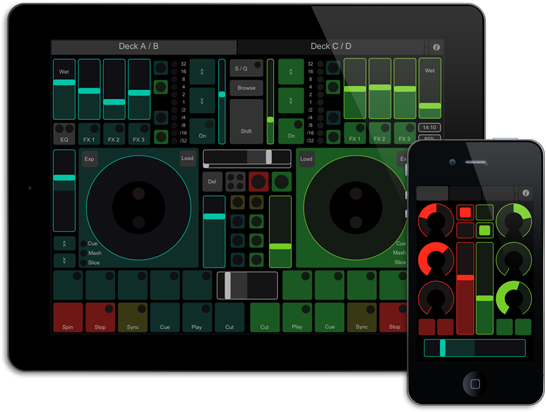
Image from the TouchOSC website
Now of course, all of this could be easily done even in whatever custom tuning environment you already have, in the end, nothing of this is rocket science, remote displays for GUIs existed twenty years ago, and probably you already have a decent collection of widgets, maybe some good colour pickers, some axis/angle selectors, sliders and so on.

The game-changer here in my mind is the multitouch support though, which enables a category of manipulators impossible on a PC alone.
Also once you support OSC, you automatically will be able to use any kind of OSC device, driver, or aggregator. A joystick as input? A webcam? Sound? Wiimote? A sequencer (see this, it's pretty crazy)? Custom hardware? You name an input method and there is probably a Midi or Osc interface for it, and pretty much any programming language will have bindings, and most libraries for creative coding, like the multiplatform OpenFrameworks.

Hardware is surprisingly not too expensive either, you can get something basic like a Korg Nanocontrol for sixty bucks, and even fancier interfaces like the QuNeo, retail for around two hundred. A fun world.

03 November, 2012

Addendum to Mathematica and Skin Rendering

Update: there was a typo in the shader code, I didn't update the screenshot...

A shader code snippet following my work on Penner's scattering approximation. I'm actually rather sure it can be done better and for cheaper, especially if you "clamp" the radius range to a narrower window, currently it goes too broad on one side while trying to go back to a standard, not wrapped N dot L for large radii, it's not really useful. But, I've already given the Mathematica code so you can do better...

float3 PSSFitFunction(float NdL, float r)
{
   float3 a0 = {0.0605, 0.2076, 0.2243};
   float3 a1 = {0.0903, 0.1687, 0.2436};
   float3 a2 = {-0.0210, -0.0942, -0.1116};
   float3 a3 = {0.6896, 0.6762, 0.6480};
   float3 a4 = {-0.1110, -0.5023, -0.6703};
   float3 a5 = {0.8177, 0.9119, 0.9209};

   float3 t = NdL.xxx * (a0*r+a1) + (a2*r+a3);
   float3 fade = saturate(a4*r+a5);
  
   return t*t*t * fade + saturate(NdL) * (1-fade);
}

02 November, 2012

How does GPU Compute work?

A presentation I made over the last month, an introduction to GPUs and GPU compute for the "non GPU" programmer. A couple of slides target the videogame industry but otherwise it's pretty general. If you want a good testbed to start playing, this previous post might help.

http://www.scribd.com/doc/111876741/GPU-Compute

Preparing for live presentation
Notes and ideas for the presentation...